
Easy Calculator
Use this simple EZ Grading calculator to find quiz, test and assignment scores:
| # Wrong | Grade |
|---|
Grade Calculator: The Ultimate Guide to Calculating Grades Accurately (2026)
Introduction
Whether you’re a student trying to answer “what is my grade?” or a teacher managing dozens of assignments, a grade calculator is one of the most useful tools you can have. From simple percentage calculations like 8/10 grade to complex weighted scores in college courses, understanding how grades are calculated can save time, reduce stress, and improve academic performance.
In this complete guide, you’ll learn:
- What a grade calculator is and how it works
- How to calculate grades manually and with tools
- Different grading systems and scales
- Real examples (like 25/30 grade or 6 out of 8 grade)
- How to use an easy grader / EZ grader
- Common mistakes and expert tips
By the end, you’ll be able to confidently calculate any grade whether it’s a quiz, test, assignment, or final exam.
What Is a Grade Calculator?
A grade calculator (also called a grading calculator, test score calculator, or grade percentage calculator) is a tool used to determine a student’s performance based on scores.
It helps convert:
- Raw scores (e.g., 18/20)
- Points (e.g., 45 out of 50)
- Percentages (e.g., 90%)
- Letter grades (A, B, C, etc.)
Common Names for Grade Calculators
You may see it called:
- Grade calc/grade cal
- EZ grader / easy grader
- Online grader/grading tool
- Test grade calculator
- Assignment grade calculator
- Gradebook calculator
All of these refer to tools that help compute grades quickly and accurately.
How a Grade Calculator Works (Step-by-Step)
At its core, a grade calculator uses a simple formula:
Grade Percentage Formula
Grade %=Points EarnedTotal Points×100\text{Grade \%} = \frac{\text{Points Earned}}{\text{Total Points}} \times 100Grade %=Total PointsPoints Earned×100
Step-by-Step Example
Let’s calculate 8 out of 10 grades:
- Points earned = 8
- Total points = 10
- Divide → 8 ÷ 10 = 0.8
- Multiply by 100 → 0.8 × 100 = 80%
✅ Final Grade = 80%
How to Calculate Grades Manually
You don’t always need an online grade calculator. You can do it yourself easily.
Example 1: Simple Test Score
Question: What is a 25/30 grade?
- 25 ÷ 30 = 0.833
- 0.833 × 100 = 83.3%
Example 2: Another Common Query
What is 6 out of 8 grade?
- 6 ÷ 8 = 0.75
- 0.75 × 100 = 75%
Example 3: Larger Score
What is a 46/50 grade?
- 46 ÷ 50 = 0.92
- Final = 92%
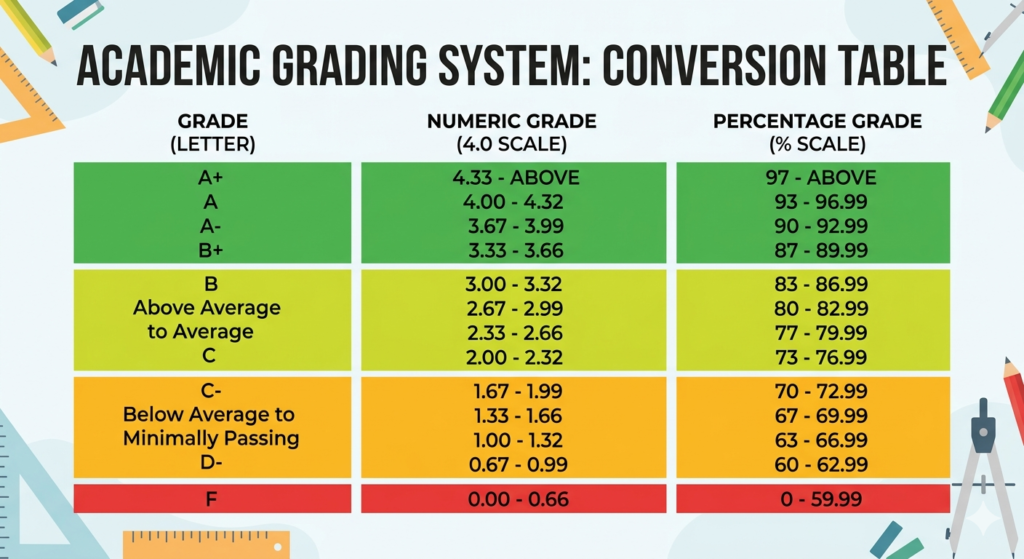
Understanding Grading Scales
Grades are often converted into letter grades using a grading scale.
Standard Grading Scale (Common)
| Percentage | Letter Grade |
| 90–100% | A |
| 80–89% | B |
| 70–79% | C |
| 60–69% | D |
| Below 60% | F |
Example
- 92% → A
- 75% → C
- 58% → F
Types of Grade Calculators
1. Percentage Grade Calculator
Used for:
- Tests
- Quizzes
- Homework
Example: What is 7 out of 8?
2. Weighted Grade Calculator
Used in schools where assignments have different importance.
Example:
- Homework = 20%
- Midterm = 30%
- Final = 50%
3. Final Grade Calculator
Helps answer:
👉 “What grade do I need on my final exam?”
4. EZ Grader / Easy Grader
A favorite tool among teachers.
It quickly converts:
- Number of questions → percentage
- Example: 20-question test grading scale
5. Gradebook Calculator
Used by teachers to track:
- Multiple assignments
- Student averages
- Overall class performance
What Is an EZ Grader?
An EZ grader (easy grader) is a fast way to calculate grades without manual math.
How It Works
You input:
- Total number of questions
- Number of wrong answers
It instantly gives:
- Score percentage
- Grade
Example
Test: 20 questions
Wrong: 4
Correct = 16
Grade:
- 16 ÷ 20 × 100 = 80%
Real-Life Grade Examples
Here are common grade calculations people search for:
Quick Grade Conversions
- 5/7 grade → 71.4%
- 10/15 grade → 66.7%
- 12/15 grade → 80%
- 24/30 grade → 80%
- 28/35 grade → 80%
- 16/20 grade → 80%
- 35/40 grade → 87.5%
- 30/50 grade → 60%
Use Cases of a Grade Calculator
For Students
- Check test scores instantly
- Calculate final grades
- Track progress
For Teachers
- Grade papers faster
- Use grading charts
- Maintain gradebooks
For Parents
- Monitor student performance
- Understand grading systems
Benefits of Using a Grade Calculator
- ✅ Saves time
- ✅ Reduces errors
- ✅ Instant results
- ✅ Easy to use
- ✅ Works for all subjects
Limitations
- ❌ Doesn’t replace understanding of the grading system
- ❌ Can be inaccurate if inputs are wrong
- ❌ Doesn’t account for subjective grading
Common Mistakes When Calculating Grades
Avoid these errors:
- ❌ Forgetting to multiply by 100
- ❌ Mixing up total points
- ❌ Using the wrong grading scale
- ❌ Ignoring weight percentages
- ❌ Rounding too early
Tips for Accurate Grade Calculation
- ✔ Always double-check numbers
- ✔ Use a calculator for decimals
- ✔ Understand your grading system
- ✔ Keep track of all assignments
- ✔ Use weighted formulas when needed
Advanced: Weighted Grade Calculation
If your course uses weights, use this formula:
Weighted Grade Formula
Final Grade=(A×w1)+(B×w2)+(C×w3)\text{Final Grade} = (A \times w_1) + (B \times w_2) + (C \times w_3)Final Grade=(A×w1)+(B×w2)+(C×w3)
Example
- Homework: 80% (20%)
- Midterm: 70% (30%)
- Final: 90% (50%)
Calculation:
- (80 × 0.2) = 16
- (70 × 0.3) = 21
- (90 × 0.5) = 45
Final Grade = 82%
How to Use an Online Grade Calculator (Step-by-Step)
Step 1: Enter Total Points
Example: 20 questions
Step 2: Enter Correct Answers
Example: 16 correct
Step 3: Click Calculate
Step 4: View Results
- Percentage
- Letter grade
Grading Charts (Quick Reference)
20 Question Test Grading Scale
| Correct | Percentage |
| 20 | 100% |
| 18 | 90% |
| 16 | 80% |
| 14 | 70% |
| 12 | 60% |
10 Question Test
| Correct | Grade |
| 10 | 100% |
| 9 | 90% |
| 8 | 80% |
| 7 | 70% |
Expert Insights & Pro Tips
1. Always Track Your Grades Early
Don’t wait until finals. Use a grade tracker regularly.
2. Focus on Weighted Assignments
Final exams often carry more weight.
3. Use Multiple Tools
Combine:
- Grade calculator
- Gradebook
- Spreadsheet
4. Know Your Passing Grade
Different schools have different standards.
Comparison: EZ Grader vs Manual Calculation
| Feature | EZ Grader | Manual |
| Speed | Fast | Slow |
| Accuracy | High | Medium |
| Effort | Low | Medium |
| Flexibility | Medium | High |
FAQ: Grade Calculator Questions
1. How do I calculate my grade percentage?
Divide your score by total points and multiply by 100.
2. What is a 6/10 as a grade?
6 ÷ 10 × 100 = 60%
3. What grade is 8 out of 10?
That equals 80%, usually a B.
4. How do teachers use an easy grader?
They enter total questions and wrong answers to instantly get percentages.
5. What is a 70 percent grade?
It’s typically a C grade.
6. How do I calculate my final exam grade?
Use weighted grading based on your course structure.
7. What is 2 out of 5 as a percentage?
2 ÷ 5 × 100 = 40%
8. What grade do I need to pass?
It depends on your school, but usually:
- 60% or above = passing
9. Can I calculate grades with points?
Yes. Just divide earned points by total points.
10. What is a gradebook calculator?
It tracks multiple assignments and calculates overall averages.
Conclusion
A grade calculator is an essential tool for students, teachers, and parents. Whether you’re calculating a simple test score like an 8/10 grade or a complex weighted final grade, understanding the process gives you control over your academic performance.
Key Takeaways:
- Use the simple percentage formula for most calculations
- Understand grading scales for accurate interpretation
- Use tools like EZ Grader for quick results
- Avoid common mistakes
- Track your grades regularly
👉 Start calculating your grades today and stay on top of your academic goals!